
Shared VPS Dedicated WP Enthusiast WP Professional WP Professional Plus
Disk allowance is how much space you are given to use on your Pair Networks account. For a more detailed explanation, go to the Disk Space and Bandwidth Usage article.
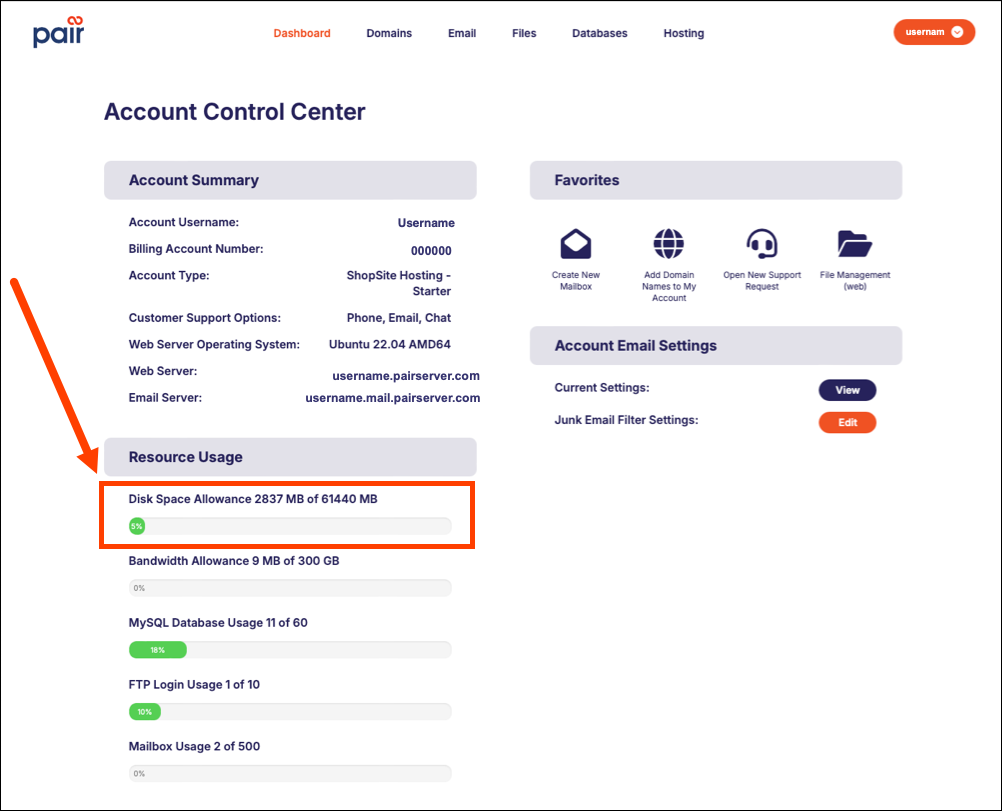
Quick View of Disk Space
- Log into the Account Control Center (ACC) at my.pair.com
- In the “Resource Usage” section, your account’s disk space allowance is listed
Disk Space shows you how much disk space you have used and how much is still available.
Some account types might show disk allowances for multiple drives or partitions.
Detailed View of Disk Space
Choose the tutorial that reflects your ACC interface type:
- Legacy Interface
- New ACC Interface
Not sure what the difference is? See Which ACC Interface Am I Using?
If you are using the Legacy Interface:
- Log into the Account Control Center (ACC) at my.pair.com
- Click Site Statistics in the left sidebar menu
- Click View Disk Usage Statistics in the drop-down
If you are using the New ACC Interface:
- Log into the Account Control Center (ACC) at my.pair.com
- In the top navigation bar, click Hosting
- In the “Disk Usage” section, your account’s disk space statistics are listed
What Happens When I Go Over?
Some accounts are fixed so that you cannot exceed your allotted disk space, while others allow you to go over, but charge a fee for doing so.
Shared Hosting and WP Enthusiast
For Shared Hosting and WP Enthusiast, there are charges that occur when you use more than your allotted disk space. To see how these fees are calculated, look at this explanation.
If you find yourself consistently exceeding the allotted space, you should consider upgrading to the next package for more space. Upgrading is easy. Check out how here.
WP Professional
For WP Professional, if you’ve reached your disk space limit, you can upgrade to the next package to increase your disk space. You can easily upgrade in the ACC. Check out how here.
Dedicated Servers
For Dedicated Servers, your hard drive must be upgraded to attain more space. To do this, simply contact Pair Networks’ Sales department:
- [email protected]
- +1 412 381-7247 (8 AM - 8 PM ET, Monday - Friday)
Virtual Private Servers (VPS)
For Virtual Private Servers, you have the option of upgrading your account or increasing your storage. You can make the upgrade in the ACC, but we recommend contacting Pair Networks’ Sales department to find which option best fits your needs:
- [email protected]
- +1 412 381-7247 (8 AM - 8 PM ET, Monday - Friday)